Drawing Sonic Pixel Art using OpenCV in Python
We were tasked in our Emerging Technologies in Computer Engineering subject last week to create art using only OpenCv drawing APIs. There were many choices as to what to draw shapes and such. I…
We were tasked in our Emerging Technologies in Computer Engineering subject last week to create art using only OpenCv drawing APIs. There were many choices as to what to draw shapes and such. I…
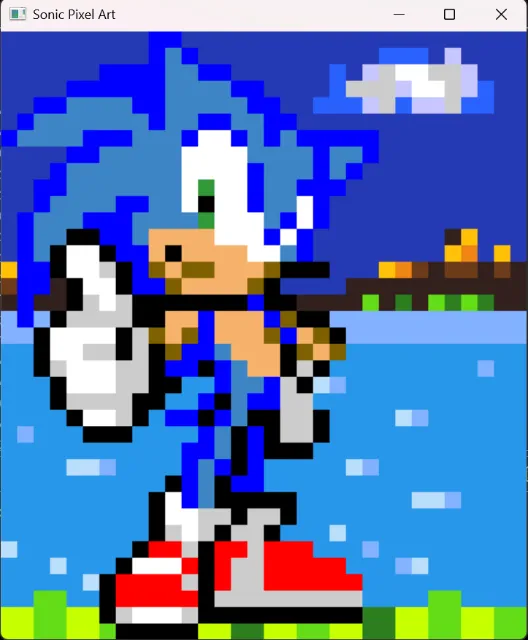
We were tasked in our Emerging Technologies in Computer Engineering subject last week to create art using only OpenCv drawing APIs. There were many choices as to what to draw shapes and such. I personally liked pixel art and so I recreated a pixel art of Sonic the Hedgehog that I found online to create my submission for activity.
There are different ways I could tackle the code for mapping out the pixel art and I chose to create a large array(37x32) with the help of ai for the base drawing. I declared certain values for different colors and started editing the color pixel by pixel in the large array to create the background and polish the Sonic character art.
After I finished mapping out the whole array with the correct colors I'm using, I used def build_rectangles() to convert the 2D pixel art map into a list of rectangles that OpenCV can draw. I then used def draw() to create a blank image/canvas and then draw all the rectangles produced by build_rectangles(). After doing all of that I use def start() to tell the program to perform the drawing, save the image, and display it.
I enjoyed all of the process that went into this subject activity and I could have tried and make it move but creating the background from scratch took alot of time since I am not a very artistic person, however I am very eager to learn more about it because I really love any form of art. I definitely learned alot using OpenCV in python, specifically the drawing APIs that were used to create the program.
